
If you're using Claude Code as your AI coding assistant—and you should be—you've probably run into the configuration problem. Claude Code is powerful, but switching between providers means hand-editing JSON files: ~/.claude/settings.json, ~/.claude.json, .mcp.json. Every time you want to move from Anthropic Direct to AWS Bedrock, or test a local model, it's a manual process prone to mistakes and just annoying enough to discourage experimentation.
We built Claude Code Personae to solve exactly that.
What Is Claude Code Personae?
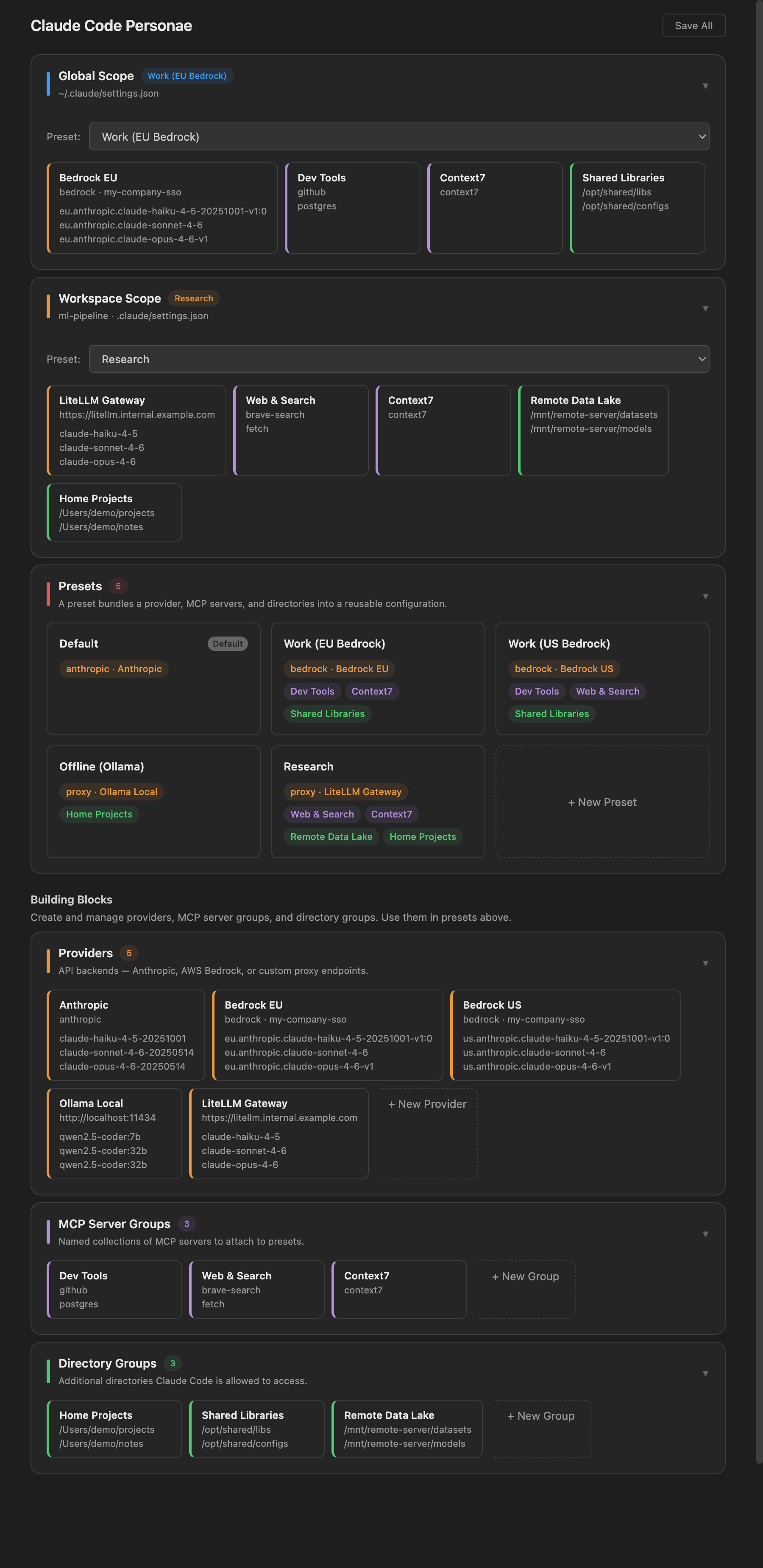
Claude Code Personae is a free VS Code extension that brings a clean GUI to Claude Code's configuration. Instead of editing JSON directly, you compose presets from reusable building blocks:
- Providers — the API backend: Anthropic Direct, AWS Bedrock, or any Anthropic-compatible proxy (Ollama, vLLM, LM Studio, OpenRouter)
- MCP Server Groups — named collections of MCP servers you want available
- Directory Groups — additional directories Claude Code can access in a given context
A preset combines these building blocks and can be applied at Global or Workspace scope, with workspace settings able to inherit from global ones. Switch presets instantly from the status bar — no JSON required.
Why AWS Bedrock Matters
At easytocloud we're deep in AWS, and the Bedrock integration is where this extension really shines for us. AWS Bedrock lets you run Claude models within your own AWS account — no data leaves your environment, you control costs through your existing AWS billing, and you can leverage your organization's IAM policies and compliance posture.
Setting up Bedrock in Claude Code is non-trivial: you need the right profile, region, inference profile ARN, and model IDs. Claude Code Personae handles this with filterable dropdowns for AWS profiles and live model discovery. You pick your named AWS profile, pick your region, and the extension does the rest.
Getting Started
Install from the VS Code Marketplace:
ext install easytocloud.bedrock-claude-code
Or open the Command Palette and search for Claude Code Personae.
Then:
- Open the Command Palette → Open Claude Code Settings
- Create a Provider — choose Bedrock and select your AWS profile and region
- Optionally add MCP Server Groups for any MCP servers you use
- Create a Preset combining your provider with any groups
- Assign the preset to Global scope (or Workspace scope for project-specific configs)
- Click Save All
From that point on, switching between, say, your Bedrock production setup and a local model for offline work is a single click in the status bar.
Other Providers
While Bedrock is our primary use case, the extension supports the full range of providers Claude Code can talk to:
- Anthropic Direct — the standard Anthropic API, with optional key configuration
- Ollama / vLLM / LM Studio — point it at your local endpoint and it discovers available models live, using the Anthropic-compatible API these tools expose
- OpenRouter — paste in the base URL and your auth token
Import/Export and Team Sharing
One feature we're particularly pleased with: import/export with credential scrubbing. You can export a preset configuration to share with your team, and the extension automatically strips API keys and sensitive values before export. Your teammates import the template and fill in their own credentials. Clean, safe, practical.
Requirements
- VS Code 1.98 or later
- For Bedrock: AWS CLI with a configured named profile (
aws configure --profile yourprofile) - For local proxies: a running Anthropic-compatible server
Try It
The extension is free and available now on the VS Code Marketplace. We're actively developing it — if you run into issues or have feature requests, open an issue on our GitHub. We'd love to hear how you're using Claude Code in your AWS workflows.